Posted on Tuesday, Oct 27th, 2026
How to Cut Dataverse Storage Costs Without Losing Your Emails
Most Dataverse environments have a closet nobody wants to open. Inside: years of emails, attachments and notes that no one has looked at since the deal closed or the case was resolved. They don’t cause trouble day to day. They sit there quietly, taking up the most expensive storage in your Microsoft stack, and the bill grows a little every month.
If your CRM runs on Dynamics 365 or another Dataverse-based app, that’s where every tracked email lands. As more of the business runs through it, that closet fills faster, and storage overages show up on the invoice sooner.
Watch time: 2 minutes
See DDA in action
A quick look at how Digital Data Archive moves emails and attachments to SharePoint while your team keeps working in Dataverse.
Find out more about DDAWhat’s hiding in there
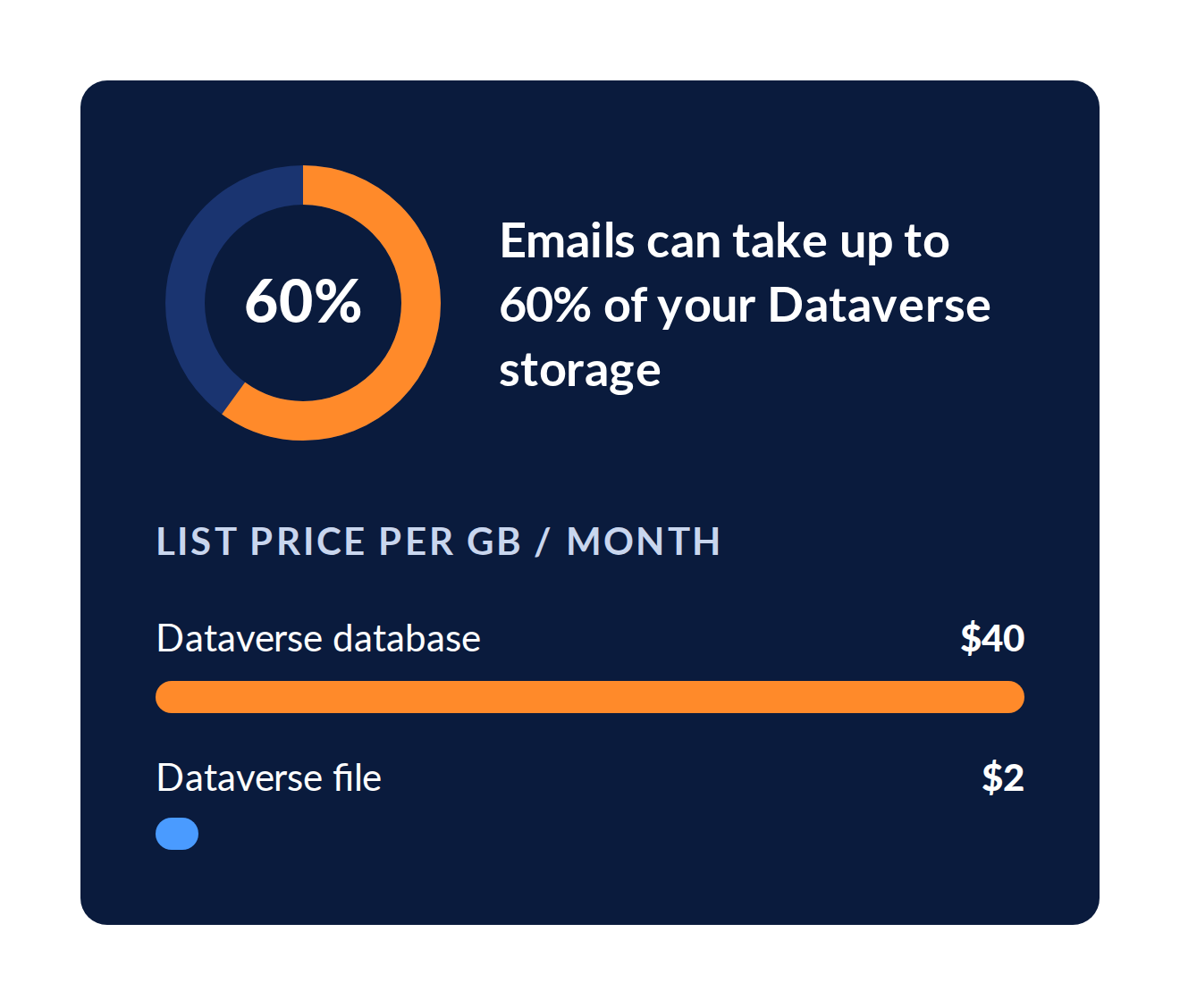
Email is usually the biggest skeleton. In many environments, emails and their attachments can account for up to 60% of Dataverse storage. Every message your sales and service teams track against a contact, account or case in your CRM lands in Dataverse, along with everything attached to it.
That matters because Dataverse storage is priced for structured, high-value business data, not for years of correspondence. At Microsoft list price, the Dataverse Database Capacity add-on runs about $40 per GB per month, and file capacity about $2 per GB per month. Once a tenant goes past its included capacity, every extra gigabyte shows up on the bill, month after month, for as long as the data stays put.
The frustrating part is that most of this data isn’t being used. It needs to be kept for reference, history or compliance, but it doesn’t need to live in the most expensive storage you own.
Keep what’s active, move what’s not
The answer isn’t deleting history or buying more capacity every year. It’s matching each kind of data to the right home, an idea called data lifecycle management.
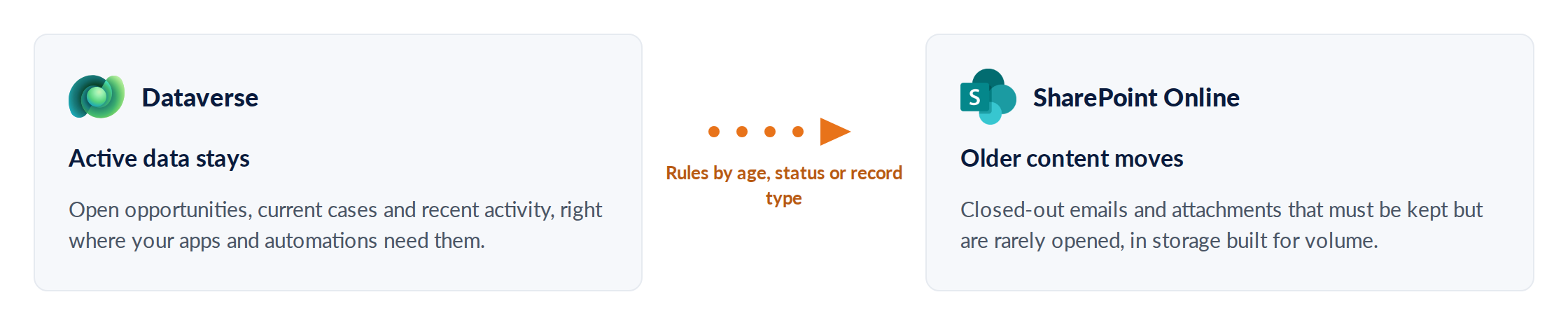
Done well, this keeps Dataverse lean and fast, and turns storage from a growing monthly expense into a predictable one.
Why SharePoint makes sense
For most organizations, SharePoint Online is the natural place for that older content. It is already part of your Microsoft 365 environment, so there’s no new platform to buy, secure or learn.
Lower cost per gigabyte
SharePoint storage comes with most Microsoft 365 plans, and many tenants have room to spare.
Same security model
Your data stays inside Microsoft 365, under the permissions, retention policies and compliance controls you already manage.
Built for documents
SharePoint is designed to hold large volumes of files and attachments, exactly what fills a Dataverse closet.
How DDA cleans out the closet
DDA puts this approach into practice. It moves emails and attachments out of Dataverse and into SharePoint Online, while your users keep working in your CRM the way they always have.
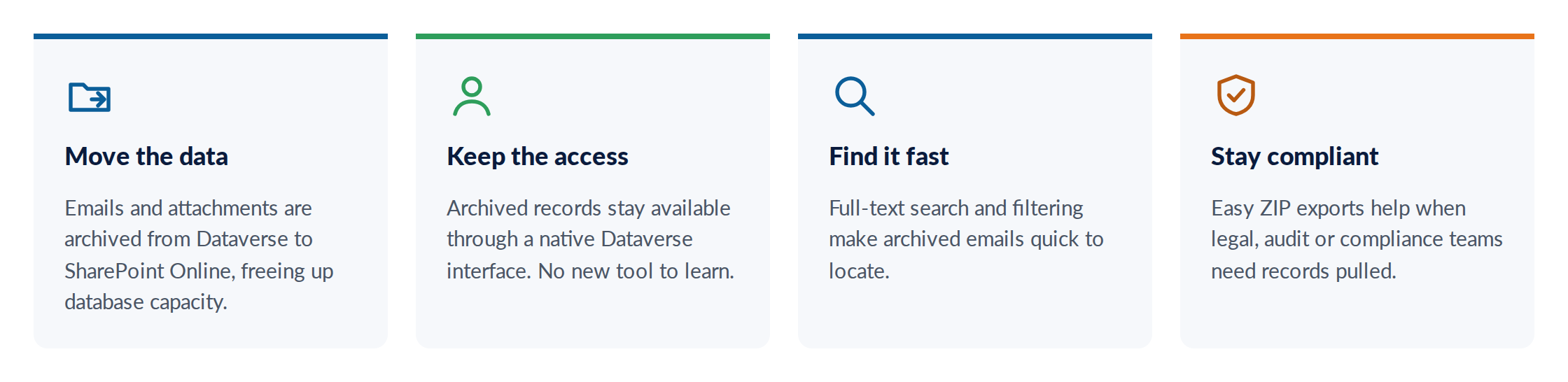
Same data. Same experience. A smaller Dataverse bill.
Signs it’s time to open the closet
- You’re getting capacity warnings in the Power Platform admin center, or you’re already over your entitlement.
- You’ve bought Dataverse storage add-ons, and the line item keeps growing at renewal.
- CRM email tracking is turned on across your organization, and nobody has looked at how much it stores.
- You’re holding onto years of records for compliance, but rarely open them.
- Someone has suggested deleting old data to save money, and your compliance team said no.
Clean closet, smaller bill
Every organization has data it needs to keep but doesn’t need to pay premium prices to store. Moving it to the right place keeps your Dataverse lean, your users productive and your storage costs under control.
Got a few skeletons of your own?
Tell us a little about your environment, and we’ll show you how much space Digital Data Archive could free up.
REFER TO OTHER RELEVANT CONTENTS
How to Cut Dataverse Storage Costs Without Losing Your Emails
Most Dataverse environments have a closet nobody wants to open. Inside: years of emails, attachments and notes that no one has looked at since the deal closed or the case was resolved. They don’t cause trouble day to day. They sit there quietly, taking up...
read more
BST Apps
Tracking time or effort of contractors, employees is one of the most crucial thing for a business especially when there are multiple sites and several hundreds working on-site and/or remotely. Without effective time tracking application, it will be difficult to generate pay stubbs and process payrolls.
read moreLatest Insights



TESTIMONIAL

Andrew Buckland

Katherine Leisinger

Michelle Rodriguez